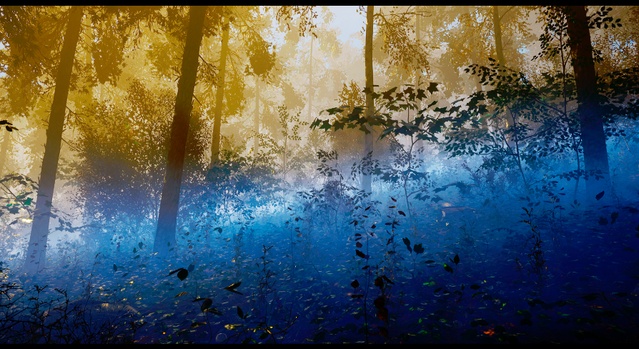
Ground Fog is a 3D model asset pack from Undo Dundo for Unreal Engine that adds ground fog using two meshes, placed through Landscape Grass Type and Foliage Paint.
Ground Fog is a fantasy environment asset from Undo Dundo that creates low-lying fog across terrain in Unreal Engine. Rather than a single static volume, it uses fog meshes placed as foliage and landscape grass, which lets you spread the effect over large areas and control its height through scaling. The pack includes a demo level setup with its own material, so you can see the fog in context before building it into your own scene. It suits fantasy and atmospheric game environments where ground mist helps set mood and depth.
Specifications
| Seller | Undo Dundo |
|---|---|
| Type | 3D Model |
| Category | Environments › Fantasy |
| Engines | Unreal Engine 4.24–5.8 |
| Distribution | Asset pack |
| Formats | Unreal Engine |
| File types | .uasset |
| Unreal target platforms | Linux, Mac, Windows |
| Texture resolution | 2048×2048 |
| Collision | No Collision |
| Polycount / vertex count | 4 + 4 |
| LODs | No LODs |
| Meshes | 2 |
| Material instances | 2 + 1 Demo LS Material |
| Textures | 1 + 1 For Demo LS Material |
| Licenses | Personal, Professional |
| Published | 2026-07-27 |
Key features
- Two fog meshes with 4 + 4 vertices each
- Textures sized 2048×2048
- Works with Landscape Grass Type and Foliage Paint
- No LODs and no collision on the meshes
- Includes a demo level material with one texture
- Designed for flat terrain at 0-15 degree tilt
- Height adjustable through Z-axis scaling
What Is Included in the Ground Fog Pack
The pack contains two meshes, two material instances and one demo level material, backed by one texture plus one texture for the demo level material. Textures are 2048×2048. The fog meshes are very light at 4 + 4 vertices and have no LODs and no collision, so they will not block movement or physics. Because the fog is built from simple geometry, it is best treated as a visual layer on top of your terrain rather than a gameplay element.
The creator describes the effect as flexible, and you can adjust its look through the scaling and grass density settings described in the setup.
Ground Fog Setup and Terrain Requirements
The fog is designed for flat terrain. The creator recommends a tilt of 0 to 15 degrees, noting that steeper slopes may show artifacts. If you see problems, the creator suggests trying a fix through Foliage Paint.
For Foliage Paint, add UD_Ground_Fog_Mesh_PF as a foliage type and set Scaling Free to X 1.5-2, Y 1.5-2 and Z 1.5-3, with Align to Normal and Random Yaw both set to False. For Landscape Grass, add a new element with UD_Ground_Fog_Mesh_GT as the grass mesh, set Grass Density between 25 and 125, enable Use Grid, and set Random Rotation to False with Align to Surface set to True. Use the Z scaling to control fog height.
Use cases
- Fantasy environment ground mist
- Atmospheric landscape scenes
- Forest and swamp terrain
- Low-lying fog over flat ground
Ground Fog FAQ
Which Unreal Engine versions does Ground Fog support?
Ground Fog supports Unreal Engine 4.24 through 4.27 and 5.0 through 5.8. The file type is .uasset and it is distributed as an asset pack.
Does Ground Fog include LODs and collision?
No. The meshes have no LODs and no collision.
How many meshes and materials are in Ground Fog?
The pack contains 2 meshes, 2 material instances and 1 demo level material, with 1 texture plus 1 texture for the demo level material.
What terrain works best with Ground Fog?
The creator recommends flat terrain with a tilt of 0 to 15 degrees, as steeper slopes may show artifacts.
Which license types are available for Ground Fog?
Ground Fog is available under Personal and Professional licenses.