Ace Socket Notify Copy is an Unreal Engine plugin by Acework that copies sockets and anim notifies from one skeleton to another. It works with Unreal Engine 4.23 through 5.4 on Windows and Mac.
Ace Socket Notify Copy is an editor tool for Unreal Engine skeletons. It is aimed at animators and technical artists who maintain character rigs and need the same socket and animation notify setup on more than one skeleton. Instead of rebuilding sockets and notifies by hand, the plugin transfers them from a source skeleton to a target skeleton. The plugin is distributed as a code plugin and is licensed for personal and professional use.
Specifications
| Seller | Acework |
|---|---|
| Type | Plugin |
| Category | Engine Tools |
| Engines | Unreal Engine 4.23–5.4 |
| Distribution | Code plugin |
| Formats | Unreal Engine |
| File types | .uasset |
| Unreal target platforms | Mac, Windows |
| Blueprints | 3 |
| C++ classes | 1 |
| Licenses | Personal, Professional |
| Published | 2024-10-15 |
Key features
- Copies sockets from Skeleton A to Skeleton B
- Copies anim notifies between skeletons from the editor
- Sockets placed at matching bone, location and rotation
- Right-click workflow with a target skeleton drop-down
- Includes 3 Blueprints and 1 C++ class
- Supports Unreal Engine 4.23 through 5.4
What the Plugin Includes and How It Works
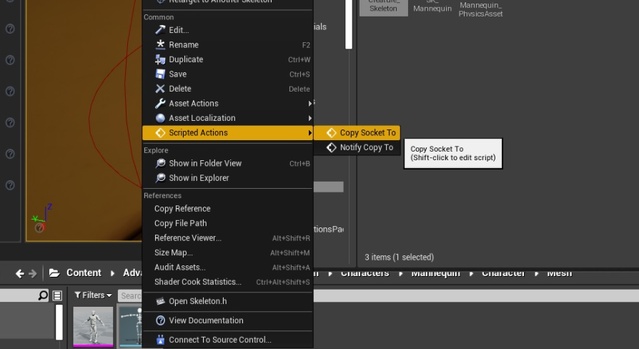
The plugin adds a right-click option in the editor to copy sockets or anim notifies from Skeleton A to Skeleton B. You choose the target skeleton from a drop-down list. The package includes 3 Blueprints and 1 C++ class, and the code modules run in the Editor.
Sockets are created on Skeleton B at the same bone, location and rotation as on Skeleton A. Save both skeletons before you start, then reopen Skeleton B to confirm the result and save it again.
Compatibility and Usage Requirements
The plugin supports Unreal Engine versions 4.23, 4.24, 4.25, 4.26, 4.27, 5.0, 5.1, 5.2, 5.3 and 5.4. It is distributed as a code plugin and works with .uasset files. Supported development platforms are Windows and Mac.
Sockets are only copied when Skeleton B has a bone with the same name as the source bone. Use the function only on skeleton assets, not on other file types.
Use cases
- Character rig maintenance
- Retargeting socket setups
- Weapon attachment on multiple skeletons
- Animation pipeline tooling
Ace Socket Notify Copy FAQ
Which Unreal Engine versions does Ace Socket Notify Copy support?
The plugin supports Unreal Engine 4.23, 4.24, 4.25, 4.26, 4.27, 5.0, 5.1, 5.2, 5.3 and 5.4.
What does Ace Socket Notify Copy copy between skeletons?
It copies sockets and anim notifies from Skeleton A to Skeleton B. Sockets are created at the same bone, location and rotation.
Why are some sockets not created on the target skeleton?
Sockets are only created when Skeleton B has a bone with the same name as the bone on Skeleton A.
Which license types are available for Ace Socket Notify Copy?
The plugin is available under Personal and Professional licenses.