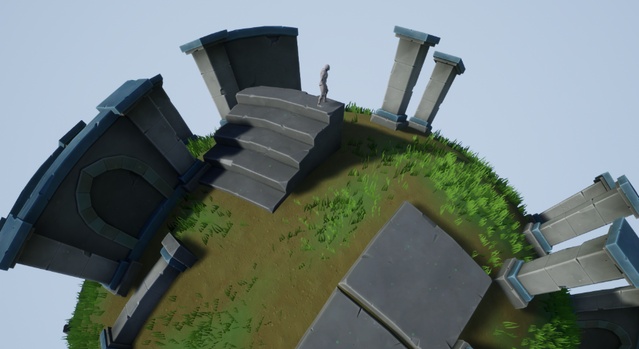
Spherical Shader is an Unreal Engine material asset pack that bends meshes around a sphere-shaped curve, using a material function, a parameter collection and a blueprint component. It supports Unreal Engine 4.21 through 4.27.
Spherical Shader is a material pack from Nightshift Studios for Unreal Engine that curves the world around a player or actor, a common effect for planet-style or curved horizon scenes. The pack is built around a Material Function that handles the sphere logic, a Material Parameter Collection that drives its values, and a Blueprint Component that attaches the effect to a character. It is distributed as an asset pack and works across Unreal Engine 4.21 to 4.27, with demo content showing the shader on walls, floors, terrain and foliage.
Specifications
| Seller | Nightshift Studios |
|---|---|
| Type | Material |
| Category | Variety |
| Engines | Unreal Engine 4.21–4.27 |
| Distribution | Asset pack |
| Formats | Unreal Engine |
| File types | .uasset |
| Unreal target platforms | Android, Windows |
| Licenses | Personal, Professional |
| Published | 2024-10-07 |
Key features
- Material Function containing the full sphere deformation logic
- Material Parameter Collection controlling the shader values
- Blueprint Component to attach the effect to a player character
- Demo map with shader applied to meshes, foliage and landscape
- Three example materials using the Spherical Shader
- Works in Unreal Engine 4.21 through 4.27
- Verified in Mobile Preview on several Android devices
- Requires subdivided meshes; low poly primitives need extra subdivisions
What Is Included in the Spherical Shader Pack
The pack contains a Material Function with the full sphere effect logic, a Material Parameter Collection that controls the function's values, and a Blueprint Component to attach to a player character or actor that the effect should follow.
The demo content includes a demo map with the shader applied to static meshes, foliage and landscape. The meshes are one floor, one pillar, three walls and one staircase, each with diffuse and normal textures. There is one foliage mesh with a diffuse texture, two terrain textures with normal maps, and three example materials that use the shader.
Setup, Mesh Requirements and Platform Support
To use the shader, add the included Material Function to the World Position Offset of your materials and add the Blueprint Component to your player character.
Meshes need enough vertices to deform smoothly. Very low poly primitives need extra subdivisions to look round. The shader works in Mobile Preview and has been verified on several Android devices. It has not been tested on iOS hardware. The Unreal target platforms listed are Android and Windows. The files are in the .uasset format.
Use cases
- Planet-curvature horizon effects
- Open-world landscape deformation
- Mobile Android Unreal projects
- Prototype curved-world mechanics
Spherical Shader FAQ
Which Unreal Engine versions does Spherical Shader support?
Spherical Shader supports Unreal Engine 4.21, 4.22, 4.23, 4.24, 4.25, 4.26 and 4.27.
How do I apply Spherical Shader to my materials?
Add the included Material Function to the World Position Offset of your materials, then add the included Blueprint Component to your player character.
Does Spherical Shader work on mobile?
The shader works in Mobile Preview and has been verified on several Android devices. It has not been tested on iOS hardware.
Why do my low poly meshes not look round with this shader?
The shader needs enough vertices to deform meshes spherically. Very low poly primitives such as basic cubes need extra subdivisions to appear round.